
From the address it was sent, to the way the numbers look, here are the red flags to look for when it comes to a scam email.
GREENSBORO, N.C. — Timing is everything, right? My mom’s computer was outdated, so she just recently bought a new computer. She bought anti-virus security software to protect her new computer.
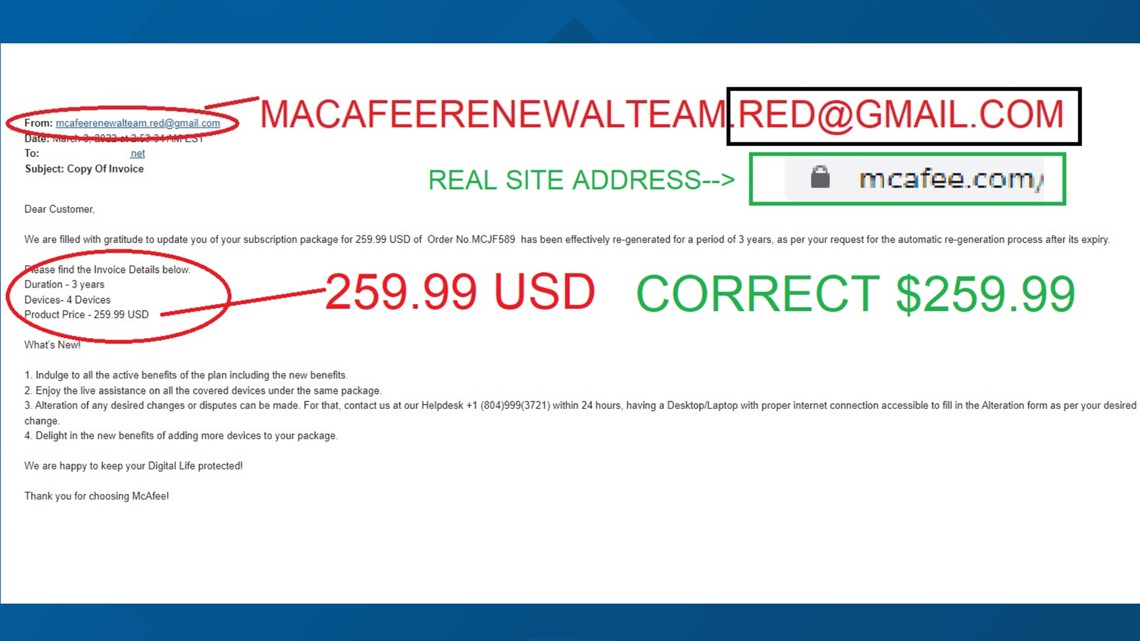
And wouldn’t you know, a few days later she got an email, it seemed to be from McAfee, the email read, ‘mcafeerenewalteam’. The email confirmed her purchase of four devices at 259.99 USD.
My mom got really upset thinking the company had made a mistake and overcharged her, but instead of calling the number in the email, mom took a deep breath and thought it could be a scam. She did what experts recommend, she waited and asked someone else to put eyes on it.
Let’s take a look at what you see when you slow down and really look at this email.
While the McAfee name is in the address, it had a ‘.red@gmail’ ending.
You and I use Gmail, the company does not. The real site address is mcafee.com. When the company emails you, it will come from their site.
The other big tip-off to me was the way the charge was listed: 259.99 USD. Nope. We always write it out this way: $259.99.
Now, there are other issues…


